Know Every USB Drive That Enters Your Network

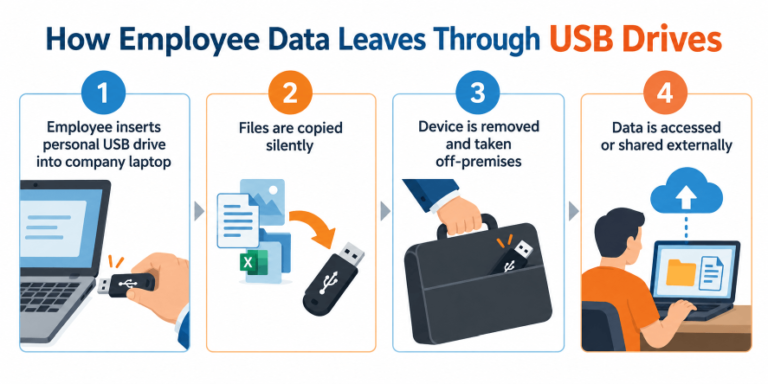
Every USB drive plugged into a company computer is a
potential exit point for your sensitive data. WorkTrak’s
USB activity monitoring captures every device insertion,
removal, and file transfer event  with the employee name, machine, and timestamp giving IT managers complete visibility without deploying a separate DLP tool.

Monitor every USB device connection across your entire workforce — capture the user, device name, machine, and exact timestamp in one clean audit-ready report — so unauthorized removable media never goes undetected, whether your team is in the office or working remotely.

USB Activity Monitoring Dashboard & Report Features

USB Device Event Log

The USB event log gives managers an instant overview of every device that connected to any monitored workstation across any date range — with full user and machine context.


Device Name & Type: See the exact label and device class (flash drive, external HDD, phone) for every USB event.

User & Machine Mapping: Every log entry is tied to the employee account and the specific computer.

Insert / Remove Timestamps: Precise date and time of every connection and disconnection, accurate to the second.
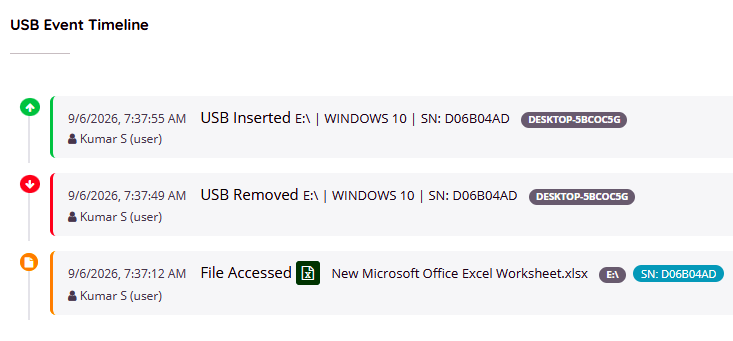
 

Worktrak - USB activity log

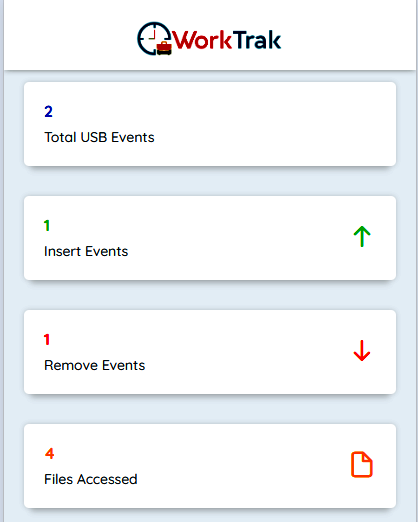
USB Activity Timeline Graph

Visualise USB device usage patterns across your organisation with an hourly and daily timeline — spot unusual spikes in removable media activity as they happen throughout the shift.


Hourly Event Frequency: Identify peak USB usage periods and flag after-hours device connections instantly.

User-Level Trend View: Drill into any employee's USB activity timeline to compare patterns over days or weeks.

Anomaly Spotting: Sudden spikes in USB connections — particularly outside working hours — surface as clear visual outliers.
 

Detailed USB Activity Log Table

Drill into the complete row-by-row USB event history for any employee, team, or workstation — with every field needed for a compliance audit or incident investigation.


Filterable by User, Team, or Date Range: Narrow the log to exactly the records you need in seconds.

Export-Ready Format: Download any filtered view as CSV, PDF, or Excel for HR, legal, or audit use.

Allowed vs. Unknown Device Status: Instantly distinguish known authorised devices from unrecognised external media.
Feature Overview & Security Value

WorkTrak USB activity monitoring dashboard showing device insertion logs, timestamps, and user details

Traditional time tracking only logs when a computer is switched on. WorkTrak’s USB Activity Monitoring goes further — it captures exactly what was plugged in, by whom, and when.

  • No Separate DLP Tool Needed: USB monitoring is built directly into your existing WorkTrak subscription — no additional software, agents, or configuration required.
  • Remote Workforce Coverage: WorkTrak’s agent captures USB events on remote and hybrid laptops with identical detail to office machines.
  • Insider Threat Early Warning: Unusual patterns — multiple USB connections in a short window, after-hours device usage, or unknown devices — are surfaced before they become incidents.
  • Audit-Ready Log Retention: All USB event logs are stored in your cloud dashboard and available for export at any time, with no manual data gathering.
  • Correlated with Screenshots: Cross-reference USB events with WorkTrak’s automated screenshots to see exactly what the employee was doing at the moment of device insertion.

Who Benefits from USB Activity Monitoring?

IT & Security Managers

Get a complete, searchable USB device audit trail without deploying a dedicated endpoint security product.

HR & Compliance Teams

Monitor USB activity during onboarding, performance reviews, and offboarding — especially in the high-risk notice period before an employee leaves.

BPO & Client-Data Operations

Protect customer records and sensitive data processed in your contact center or back-office flag any unauthorized removable media before it leaves the premises.

Remote & Hybrid Teams

Apply your USB device policy consistently across office and remote workstations from one centralised dashboard.

Finance & Legal Teams

Maintain a structured USB access log as evidence of data governance for regulatory audits, ISO 27001 reviews, or internal investigations.

Frequently Asked Questions

WorkTrak logs every USB device insertion and removal event with full user, device, and timestamp context. For file-level detail, USB events can be correlated with WorkTrak's automated screenshot feature — which captures what was on screen at the exact moment of a device connection — providing a comprehensive view of activity during any USB session.

Yes. WorkTrak's monitoring agent runs on every enrolled workstation regardless of location. USB events are captured and synced to your cloud dashboard in real time, whether the machine is in your office, at an employee's home, or in the field.

WorkTrak is a transparent monitoring tool. We recommend informing employees about your device usage policy as part of your acceptable use agreement and onboarding documentation. Transparent monitoring improves compliance and reduces friction.

Yes. All USB activity logs in WorkTrak can be exported on demand in CSV, PDF, or Excel format directly from the dashboard. You can filter by date range, user, team, or device before exporting to produce exactly the records your audit requires.

Yes. WorkTrak's agent captures events locally and queues them for upload. USB activity recorded during an offline period is automatically synced to the dashboard once the internet connection is restored — no events are lost.

Enterprise DLP tools are complex, expensive, and require dedicated security teams to operate. WorkTrak's USB activity monitoring gives small and mid-sized businesses the most critical capability — a complete, user-linked USB event log — as part of their existing employee monitoring subscription. It is practical, affordable, and ready in minutes.

Ready to secure your data from unauthorized USB activity?

Start monitoring USB device connections with WorkTrak today — no extra setup, no separate software, no compromise on privacy.